To Do List
- 4.7
- Rating
- 10.00M
- Installs
- Free
- Price

 Analysis by App-foxy
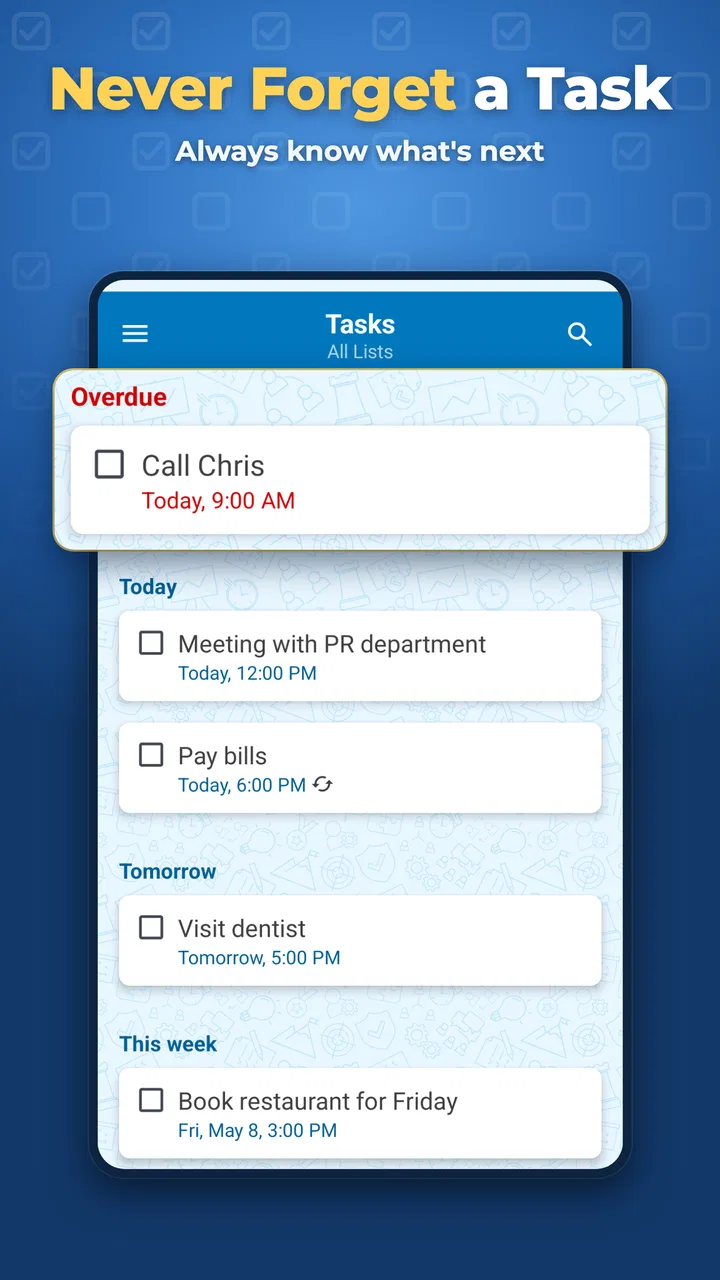
I tend to judge a to-do app by what happens on an ordinary busy day, not by how attractive its first screen looks. With To Do List from Splend Apps, I started with the kind of scattered workload most people actually have: a bill to remember, a message to send, a shopping item, and one important job that could not be allowed to disappear under everything else. The app is free, aimed at everyone, and built for productivity rather than project management. That focus is its main appeal.
My first impression was that this is a straightforward place to collect tasks and move them toward completion. It does not try to turn a simple reminder into a complicated planning system. If you want a personal list that opens quickly and keeps the next action visible, it makes sense. If you need a shared workspace, detailed project dependencies, or a full calendar replacement, you should approach it with different expectations.
From a scattered thought to a finished task
I find the handoff point especially useful for household tasks: writing down who needs to act next keeps a reminder from becoming a vague, shared assumption. In this section, I’ll look at how a personal checklist can support everyday coordination while making clear where a genuinely shared system is the better fit.
You May Also Like

 Blood Strike: 2.5 Anniversary
Blood Strike’s Loadouts Turn Every Drop Into a Tactical Gamble
A close look at Blood Strike’s custom loadouts: how fast access to signature weapons reshapes its battle royale rhythm, rewards preparation, and narrows the gap between fights.

 Pandora - Music & Podcasts
Pandora’s Music Is Easy to Start, but Harder to Recover
Pandora’s strength is its low-effort path from a seed to a station. Its weak spot is how much confidence it asks you to place in connection, setup, and quiet recovery.

 8 Ball Pool
 Is Built on Rivalries, Rematches, and Routine
A close look at the rivalries, rematches, shared routines, and unanswered safety questions that turn a quick pool match into a persistent mobile community.

 Samsung Music
’s Quiet Strength Is Playing What You Already Own
Its reach comes less from spectacle than from dependable access to a personal library. That simplicity is both the app’s strongest retention engine and its ceiling.

 AccuWeather: Weather Radar
AccuWeather Review: A Quick, Clear Forecast for Everyday Decisions
For everyday plans, the best forecast is the one you can understand quickly. AccuWeather makes rain timing, radar, and local conditions easy to act on, with a few trade-offs.

 Hill Climb Racing
Why Hill Climb Racing Still Turns Crashes Into One More Run
A tiny car, a bumpy hill and one more upgrade: Hill Climb Racing keeps resurfacing because its simple chaos makes every near-miss feel personal.
More From Our News Desk



Starting with the moment a task appears
The most useful way to use this app is to treat it as an external memory, not as a diary of everything you have ever done. When something comes to mind, I would add it before returning to the task already in front of me. That simple habit prevents the usual problem of trusting memory until the day becomes crowded.
A realistic example is a weekday morning. I need to call a service provider, buy ingredients, review a document, and remember to take something with me when leaving home. Instead of keeping those thoughts in separate places, I put each one into the list. The value is not in writing long explanations; it is in capturing a clear action while it is still fresh.
I found that wording matters more than people expect. “Report” is vague, while “send the revised report” tells me what completion actually means. “Shopping” is also less useful than naming the item or the small group of items I need. This is one of the app’s quiet strengths: because the interface is uncomplicated, it encourages short, practical entries rather than elaborate notes that take longer to maintain than the task itself.
For a quick capture system to work, adding an item has to feel easier than ignoring it. That is where a focused to-do app can beat a notes app. Notes are good for storing information, but a task list gives unfinished actions a more obvious place in the day. I would still use a notes app for meeting details or research, then create a separate action here when there is something I personally need to do.
Turning a long list into a usable next step
Once several tasks are present, the danger changes. The problem is no longer forgetting; it is seeing too many reminders at once and doing none of them. I would sort the list mentally into three groups: something that matters today, something that can wait, and something that is only a possible future action.
That distinction keeps the app from becoming a guilt machine. A task should not remain at the top forever simply because it was once urgent. I prefer to review the list at the beginning and end of the day, remove completed work, and rewrite anything that has become unclear. A short list of well-defined actions is much easier to trust than a huge collection of vague intentions.
One practical workflow is to create tasks around handoffs. For example, “ask Alex for the figures” is different from “add figures to the presentation.” The first task depends on another person, while the second depends on receiving the information. Keeping those actions separate makes the delay visible. If I only write “finish presentation,” I may not notice that the real next move is sending a message.
This is also where I would avoid overloading individual entries. A task list is not automatically a project plan. If a job has many stages, I would break it into a few meaningful actions rather than placing an entire process inside one sentence. The app works best when each item can be completed, postponed, or handed to someone else without a long explanation.
Using reminders without creating more noise
Reminders are useful when a task is tied to a time or place in my day, but I would not attach one to everything. If every small action demands an alert, the alerts stop feeling important. I reserve them for things that are easy to miss: a call that must happen during business hours, an item needed before leaving, or a deadline that has consequences.
The better question is not “When do I want to be reminded?” but “When would forgetting this become a problem?” That change in thinking makes the list calmer. A task that can be handled whenever I next open the app does not need the same treatment as a task that becomes useless after a particular moment.
I also prefer reminders that support a routine rather than interrupt it constantly. For a morning plan, I can review the list once and choose what to do first. For a time-sensitive obligation, a reminder gives the app a role beyond being a static checklist. The trade-off is that the app remains dependent on my discipline: it can show me what I recorded, but it cannot decide whether an item is still relevant.
Completing work and keeping the list honest
Checking off an item is more valuable when the wording was concrete from the beginning. “Send the form” gives me a clear finish line. “Deal with form” does not. I would rather spend a few extra seconds creating a precise task than repeatedly reopening one that never feels complete.
At the end of a work session, I would look at unfinished items and ask why each one is still there. Sometimes the task is too large and needs splitting. Sometimes I am waiting for another person. Sometimes it is no longer worth doing. The app can hold all three situations, but it cannot distinguish them for me, so the quality of the result depends on this small review habit.
This is an important difference between a personal to-do list and a more advanced task-management service. A larger platform may offer richer status fields, team assignments, or project views. To Do List keeps the path shorter, which is helpful for personal errands and daily commitments, but it also means I need to supply the judgment that a more elaborate system might make visible.
Where handoffs become the real test
Many tasks do not fail because I forget them. They fail because another person has to respond first. I might need a colleague to approve a document, a family member to confirm a plan, or a shop to provide information. In those cases, I use one entry for the outgoing request and another for the follow-up.
That two-step method prevents a common mistake: marking the entire job as active when I have only sent the first message. The handoff has happened, but the outcome has not. A follow-up task gives me a place to return to the matter without pretending that it is finished.
This approach is also useful outside work. Suppose I need to arrange a repair. The first action is contacting the provider. The second is confirming the appointment. The third may be preparing access to the property. Each item has a different owner or condition, and separating them makes the process easier to resume after an interruption.
For a shared household, however, I would be careful about treating this app as a collaboration tool. A personal list is excellent for remembering that I need to buy detergent. It is less suitable as the only system when several people must see changes, claim responsibilities, or discuss progress. In that situation, a shared task service is likely the better choice, even if it feels heavier.
What the app does well in everyday use
The strongest quality here is restraint. Splend Apps has kept the product recognizable as a personal task list rather than surrounding every action with a planning layer. That makes it approachable for someone who has never maintained a productivity system and wants to start with a few daily reminders.
I also like the way this kind of focused design supports quick decisions. When I open the list, I am not tempted to spend ten minutes rearranging a dashboard. I can identify the next action and get back to it. For errands, personal administration, study checklists, and recurring household responsibilities, that directness is more useful than a feature-heavy interface.
The app has also had time to mature: it was released on November 14, 2013, and the current version is 5.1.10. Its scale is reflected in more than ten million installs, with an average rating of 4.7 from roughly 933 thousand ratings and about 22 thousand written reviews. Those figures do not guarantee that it will fit every workflow, but they do suggest that the basic approach has connected with a large audience.
It is free to start, while optional in-app purchases cost $2.99 per item. That makes it easy to try without committing money first. I would still inspect which functions are included in the free experience before building an elaborate routine around it, especially if a particular advanced convenience is important to me.
Small habits that make a big difference
My first tip would be to write tasks as visible actions, not topics. “Email the landlord” is actionable; “landlord” is merely a reminder that a subject exists. This makes the list useful during tired moments, when I do not want to reconstruct what I meant earlier.
My second tip is to create a follow-up at the same time as an external request. If I send a message today, I can add a later check-in immediately rather than relying on memory. This is especially helpful for tasks that leave my control after the first step.
My third tip is to separate “waiting” from “doing” in the wording. I might write “wait for invoice from supplier” after sending the request, while keeping “send invoice request” as the completed action. That small distinction stops me from repeatedly attempting work that is already in someone else’s hands.
A fourth useful habit is a deletion pass. Not every task deserves to be postponed. If an item has survived several reviews without becoming more important, I ask whether it should be removed, rewritten, or scheduled for a real decision. A clean list is not one with no unfinished work; it is one where every unfinished item still deserves attention.
Where the flow breaks down
The app is not the right fit for everyone. I would skip it if my main requirement were a shared team board, detailed project reporting, document collaboration, or a sophisticated calendar-and-task relationship. Its simplicity becomes a limitation when a job needs many people to coordinate inside the same workspace.
I would also look elsewhere if I depend on rich context attached to every task. Some work requires files, long discussions, checklists within checklists, or a visible history of decisions. A dedicated project-management tool handles that complexity more naturally. Trying to force all of it into a simple personal list can create clutter and make the quick-capture advantage disappear.
Another friction point is the human one. The app cannot rescue a list that is never reviewed. If I add every obligation but never decide what matters today, I have only transferred the mess from my head to a screen. Likewise, if I use reminders as a substitute for planning, I may receive alerts without having enough time or information to act on them.
There is also a trade-off between speed and explanation. A short task is fast to enter, but a future version of me may need more context. I solve that by adding just enough detail to identify the next action, while keeping longer reference material elsewhere. Users who want every note, file, and conversation stored beside the task may find this separation inconvenient.
Who should use it and who should choose something else
I would recommend it to someone who wants a clear personal checklist for errands, appointments, household jobs, study actions, or everyday work follow-ups. It is especially suitable for people who find larger productivity systems intimidating and want to build the habit of capturing and completing tasks first.
It can also suit a person moving away from paper lists. The important advantage is not that a digital list makes every plan smarter; it is that the list is easier to revisit, update, and use across changing days. The free price removes much of the risk of experimenting with that habit, and the Everyone age rating makes it broadly approachable.
I would choose a different option for a team that needs shared ownership, for a project with many dependencies, or for anyone who wants a single workspace combining detailed notes, files, conversations, and schedules. In those cases, the extra structure of another productivity tool may justify the additional learning curve.
My final take after following the whole workflow
From the first stray thought to the final check mark, To Do List works best when I keep the process modest: capture a clear action, decide what matters, record the handoff, review what is waiting, and remove what no longer deserves space. It is not a complete life-management system, and I do not think it should pretend to be one.
What I appreciate is the low barrier between remembering and acting. The app gives personal tasks a dependable home without demanding that I redesign my entire routine. Its weaknesses appear when the work becomes collaborative, document-heavy, or too complex for short action entries, but those are reasonable boundaries for a focused checklist.
My recommendation is simple: choose it if you want less mental clutter and a practical personal task flow, not if you need a full project command center. Used with precise wording and a brief daily review, it can turn a scattered set of obligations into a manageable sequence of next steps.
FAQs for To Do List
01What features does the To Do List app offer?
The To Do List app provides a range of features designed to enhance productivity. Users can create tasks, set deadlines, and prioritize them by importance. It also includes reminders, recurring tasks, and integration with calendars. Additionally, the app offers collaboration tools for sharing lists with others, making it ideal for both personal and professional use.
02Is the To Do List app available on both Android and iOS?
Yes, the To Do List app is available for download on both Android and iOS platforms. Users can find it on the Google Play Store for Android devices and the App Store for iOS devices. This cross-platform availability ensures that users can synchronize their tasks across multiple devices seamlessly.
03Does the To Do List app require an internet connection to function?
The To Do List app can function offline, allowing users to create and manage tasks without an internet connection. However, some features, like syncing across devices and collaborating with others, require internet access. Once reconnected, the app will automatically update and synchronize any changes made offline.
04Are there any in-app purchases or subscription fees associated with the To Do List app?
The To Do List app offers a free version with basic features, but users can opt for a premium subscription. The premium version includes advanced features such as enhanced collaboration tools, additional themes, and priority support. Subscriptions can be monthly or yearly, providing flexibility based on user needs.
05How user-friendly is the To Do List app for beginners?
The To Do List app is designed with user-friendliness in mind, featuring an intuitive interface that beginners can easily navigate. It includes tutorials and tooltips to help new users get started quickly. The app also offers customization options, allowing users to tailor their experience according to their preferences.
Pros
- Intuitive interface makes task management easy.
- Syncs seamlessly across multiple devices.
- Offers customizable reminders and alerts.
- Allows for color-coded categorization.
- Supports collaboration with shared lists.
Cons
- Limited free version features.
- Occasional sync delays.
- No offline mode for task editing.
- UI can feel cluttered with many tasks.
- Premium version is relatively expensive.

To Do List
Gallery